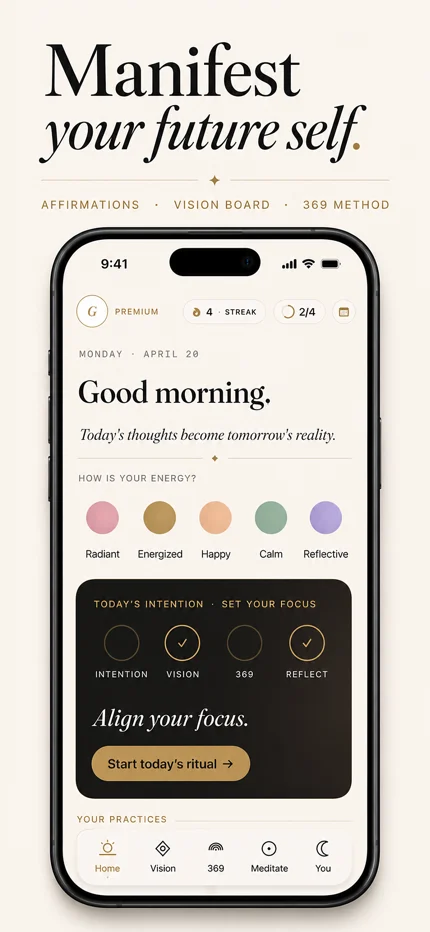
What you can do in MYLA
- Write a specific gratitude entry. The gratitude step asks, “What are you grateful for, and why?” Add the moments and people you want to remember.
- Revisit a saved day. Use the calendar on Home to select a previous date and return to that day’s entry.
- Connect gratitude with your intentions. The daily entry flow also includes a mood check-in, affirmations and goals.
How to start a gratitude journal on your iPhone
- Open your daily entry from Home. Begin with the mood check-in, then continue to gratitude.
- Name one thing you appreciate. Think of a particular moment, such as a friend checking in or a quiet walk.
- Add why it mattered. “My friend called before my interview, and I felt supported” gives you something concrete to revisit.
- Continue through your daily entry. Add affirmations and goals that fit your day, then finish the flow. Use the Home calendar when you want to revisit an earlier entry.
Need a starting question? Choose one of our 12 gratitude journal prompts, with options for mornings, evenings and difficult days.
A gratitude journal example
Here is a sample entry you can adapt to your own day.
I'm grateful that my friend checked in before my interview. Her message reminded me I had someone cheering me on.
Start with a moment, then explain its meaning. Your entry can be short. You can appreciate the same person again tomorrow and describe a different moment.
Write your own entry in MYLA ↗For iPhone & iPad · Free download · In-app purchases
Make room for a daily gratitude practice
Choose a moment that fits your day, such as after breakfast or before bed. A morning entry can acknowledge something you have available today. An evening entry can capture a small moment you want to remember.
For a gentle starting question, try “What made today a little easier?” On a difficult day, write what feels honest or return another time.
To bring gratitude together with an intention and a practical next step, follow our five-minute daily routine.
Questions about MYLA’s gratitude journal
Is MYLA free to download?
Yes. MYLA is free to download and offers an optional Premium subscription. Some features require Premium. Check the available plans and prices in the app before subscribing.
Can I use MYLA on an iPad?
MYLA is available for iPhone and iPad. Check its App Store listing for current software requirements and availability.
Can I read previous gratitude entries?
Use the calendar on Home to choose the date of a saved entry. You can return to that day’s gratitude as part of your daily entry.
What should I write in a gratitude journal?
Write something you appreciate and why it mattered to you. A person’s action, a small comfort or an ordinary moment can give you a starting point. Our worked gratitude entry includes a simple structure you can adapt.
How does gratitude fit with affirmations?
Gratitude describes something you appreciate. An affirmation gives words to a quality or approach you want to practice. MYLA includes both in the daily entry flow. Explore our intention and affirmation examples.
Begin with one moment.
Write what you appreciate today and keep it alongside your intentions in MYLA.
Download MYLA ↗For iPhone & iPad · Free download · Some features require Premium