What is a digital vision board?
A digital vision board is a collection of images representing goals, experiences or qualities you want to make room for. It can be a prompt for reflection. It is not evidence that a desired outcome is guaranteed.
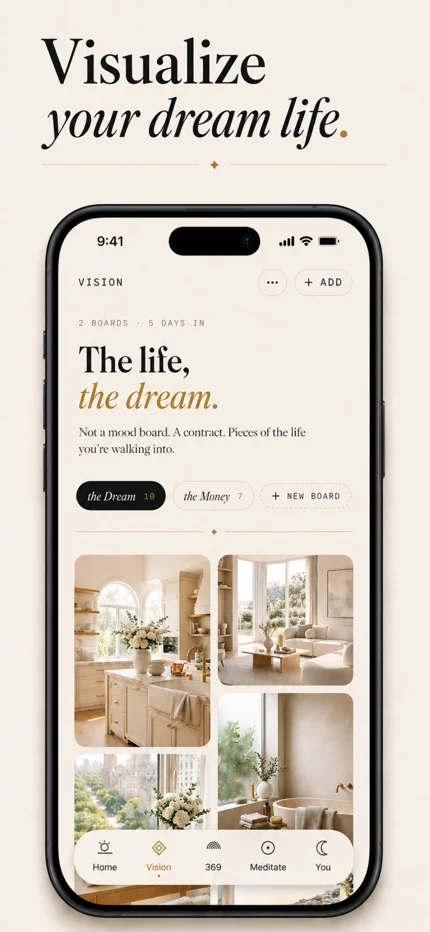
MYLA includes vision boards alongside 369 affirmations, guided breathing and meditation audio. The app preview on this page shows MYLA’s actual vision board experience.
Plan your first board
- Pick a focus. Start with a project, a place you want to experience or a feeling you want your day to have.
- Choose a small set of images. Use pictures you own or have permission to use. Choose images that mean something to you, rather than trying to make the perfect collage.
- Collect your vision in MYLA. Use the app’s vision board feature to bring those images together. Check the current in-app options as layouts and available features may change.
- Give each image a practical meaning. Ask yourself what choice it could influence this week.
- Come back to it. Review your board during a short daily pause, and change the images as your priorities change.
Premium features
Some vision board features, including adding your own photos and creating additional boards, require MYLA Premium. Check the options available in your app before subscribing.
An example: a more creative week
You might choose a photograph of a sketchbook, a quiet desk and a local gallery. Each represents a different intention: practice, space and inspiration.
Turn those images into decisions: sketch for ten minutes, clear one part of your desk, or plan a gallery visit. The board gives you a visual reference; the decisions are yours to make.
Connect your board to a daily practice
Look at one image and choose an affirmation that supports its meaning. For the sketchbook example, you might say, “I give myself space to practice.” Our five-minute routine shows how to combine a board with an intention and a next step.
If you prefer a structured repetition practice, explore MYLA’s spoken 369 affirmations.
Is MYLA available on my device?
MYLA is available for iPhone and iPad. Check the App Store listing for the latest software requirements and availability in your region. This page does not offer a web-based board editor.
Make space for your practice
MYLA is free to download. Some features require an optional MYLA Premium subscription. Check current plans, prices and available features in the app before subscribing.
Download MYLA ↗For iPhone & iPad · In-app purchases